
Suno to MIDI: Official Get MIDI or WAV Stem Workflow
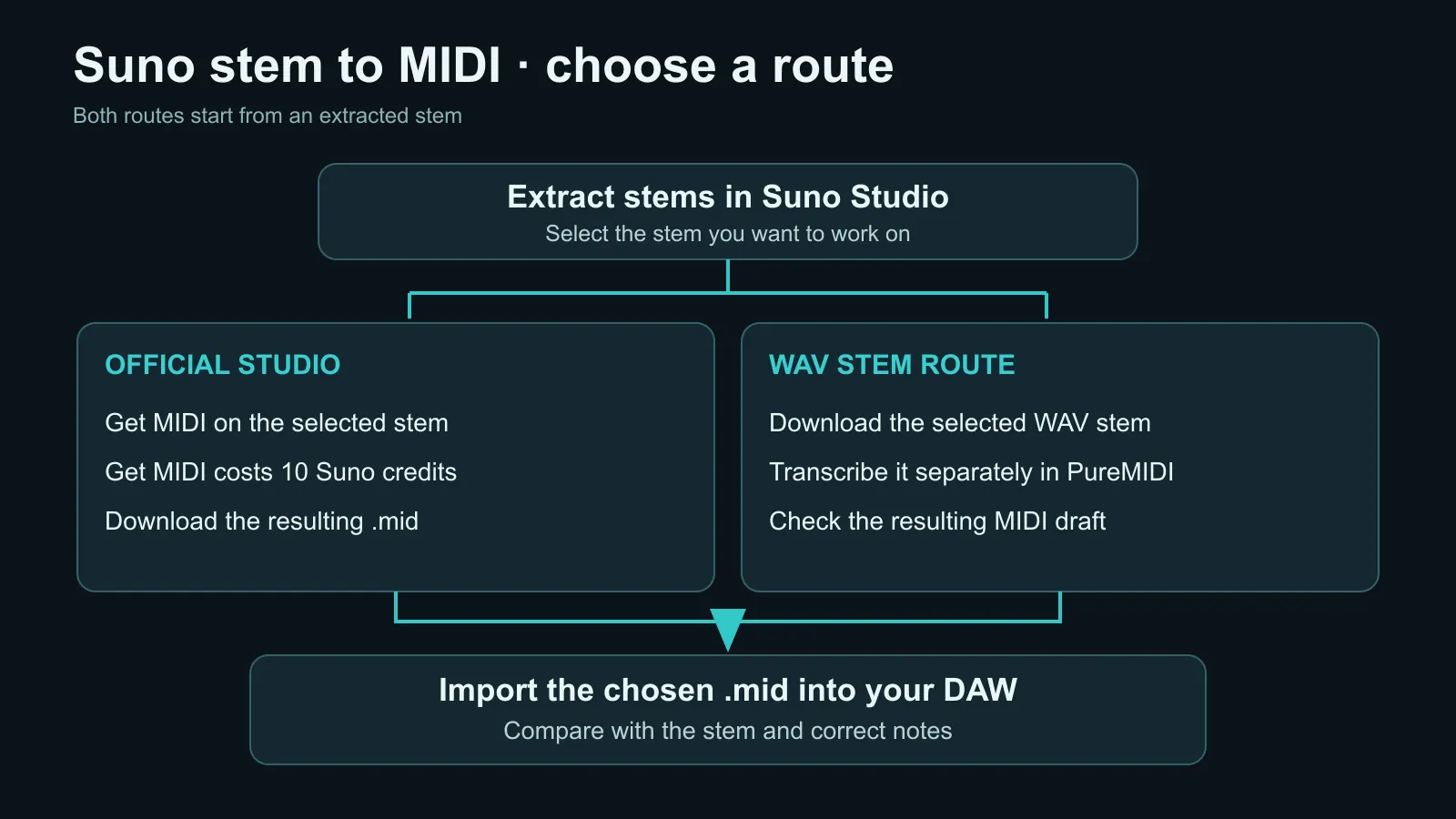
In Suno Studio, extract stems, select a stem, and choose Get MIDI. Suno's official guide says this costs 10 credits. For a separate result or more per-part control, download the WAV stems and convert them one at a time.
Can Suno export MIDI directly?
Yes. In Suno Studio, open the Stems panel, extract stems from a clip, select the stem you want, and choose Get MIDI. Suno's official Studio export guide lists Get MIDI at 10 credits; the resulting MIDI file can be imported into a DAW.
Treat any audio-to-MIDI result as a transcription draft. A clean vocal, bass, or lead stem is easier to inspect than a dense mixed stem, and you should still compare the MIDI against the source before arranging or publishing it.
PureMIDI is an alternative workflow, not a claim that Suno lacks MIDI export. Use it when you want a browser-based second transcription, want to compare outputs, or already have downloaded WAV stems outside Suno Studio.
Can’t find Get MIDI in Suno?
Check an extracted stem in Studio, rather than the full-song export menu. If Get MIDI is unavailable in your account, check Suno’s current help and plan controls. Already have an authorized WAV stem? You can preview a separate MIDI transcription with PureMIDI before choosing a complete conversion. Audio export and MIDI extraction are different actions.
Alternative 3-step Suno stem workflow
Step 1. Generate a song in Suno and export its stems (vocals, drums, bass, other) as separate audio files.
Step 2. Upload each stem (except drums) to PureMIDI's audio-to-MIDI tool and download the resulting .mid files.
Step 3. Import all the MIDI files into your DAW (Logic, Ableton, FL Studio, etc.) on separate tracks.
Total hands-on time is about 5 minutes per song, plus conversion time. Working stem by stem makes it easier to identify which part needs correction and to compare the output with Suno's Get MIDI result.
Step 1: Get clean stems from Suno
In Suno Studio, use the Stems panel to extract the available parts, then download the stem you want as a high-quality WAV. Suno's current product and plan availability can change, so check the controls shown in your account rather than relying on an old plan list. A typical separation includes:
- vocals.wav — lead vocal line
- drums.wav — full drum kit
- bass.wav — bass guitar / bass synth
- other.wav — everything else (guitar, keys, pads, leads)
If your account does not expose stem extraction, you can export the audio you are authorized to use and separate it with a third-party stem tool before conversion. Separation artifacts can reduce transcription quality, so inspect the isolated audio first.
Step 2: Convert each stem to MIDI
Open PureMIDI's audio-to-MIDI tool or the dedicated WAV-to-MIDI converter. For each stem, drag the .wav file into the upload zone and download the resulting .mid file.
Per-stem accuracy expectations:
- vocals.wav → vocals.mid: best fit when one lead line is clear; check slides, breaths, and note boundaries.
- bass.wav → bass.mid: usually a strong fit when the fundamental is clear; check octave errors and short notes.
- other.wav → other.mid: usable but mixed quality. If the "other" stem contains piano + guitar + pads, you'll get all of them as a polyphonic MIDI track, which is OK as a starting point but may need cleanup.
- drums.wav → don't use single-melody conversion. It follows pitched notes and can turn drum hits into piano notes. Use the workarounds in our drum stem guide. Full-song conversion can include a draft drum track from a full mix, but it does not yet provide reliable kick/snare/hat mapping.
Step 3: Import MIDI into your DAW
Drag all the .mid files into your DAW. Specific instructions per DAW:
- Logic Pro: drag each
.midonto the Tracks area. Logic auto-creates a new Software Instrument track per file. Pick an instrument (e.g., a synth pad for "other", a vocal-style synth for "vocals") and play. Full Logic workflow guide: Audio to MIDI in Logic Pro. - Ableton Live: drag each
.midonto an empty MIDI track. Add Operator, Wavetable, or any instrument. Full Ableton workflow: Audio to MIDI in Ableton. - FL Studio: File → Import → MIDI File. Each MIDI loads onto its own pattern. Assign your favorite plugin instrument.
- Cubase / Reaper / GarageBand: drag-and-drop works the same way. Each MIDI file becomes a new track.
Now you have full creative control: change instruments, transpose, re-arrange, replace the AI-generated guitar with your real guitar tone, swap a synth pad for strings, anything you want.
What about Udio, MusicGen, ACE-Step, and other AI music tools?
A similar workflow can apply to other generators when you can export authorized stems. If you only have a final mix, source separation may help before transcription, but separation artifacts can also create false notes.
Common mistakes to avoid
- Don't put a full Suno mix through single-melody conversion. That option is for one clear part. Choose full-song conversion for a full mix; it returns a multi-track draft that still needs cleanup.
- Don't expect production-ready drums. Full-song conversion may include a draft drum track, but PureMIDI does not yet classify every hit into reliable kick/snare/hat mapping. For drum MIDI, see our drum stem guide.
- Don't skip cleanup. Even with stem-by-stem conversion, plan to spend 5-10 minutes in your DAW quantizing rhythm and fixing obvious wrong notes. AI MIDI is a starting point, not a finished arrangement.
- Don't expect MIDI velocity to match the original mix. Velocity detection is rougher than pitch detection; you may want to flatten or re-shape velocity in your DAW for consistency.
FAQ
What should I check before starting?
Suno's official Studio guide lists Get MIDI at 10 Suno credits. PureMIDI is a separate service; check its current conversion terms before continuing. Suno feature availability depends on your account and plan.
Should I use Suno Get MIDI or PureMIDI?
Start with Suno Get MIDI when it is available in your Studio account. Use PureMIDI when you want an independent result to compare, already have exported WAV stems, or want to choose between a single-line melody draft and a full-song multi-track draft.
Can I do all this in one click?
Yes — the full-song route is live. Choose the mixed-audio option, upload a Suno mixed export, and PureMIDI returns one multi-track .mid draft covering melody, bass, chords, drums, and other parts (6-15 credits by length). Individual stems remain the highest-control input when available.
What about the lyrics? Can I extract lyrics + melody together?
MIDI does not contain lyrics. Single-melody conversion returns the pitched line from the stem you upload; full-song conversion returns a multi-track MIDI draft from a full mix. Copy lyrics from Suno's UI separately.
Is this the same as "Suno to MIDI" in Suno Studio?
Both workflows can start from stems. Suno's Get MIDI runs inside Studio and costs 10 Suno credits per the official guide; PureMIDI is a separate browser service that accepts downloaded audio and provides its own transcription result.
Try this workflow now
Upload an authorized Suno WAV stem and inspect the available MIDI preview before deciding whether to continue.
Open the Audio to MIDI tool →