Review a transcription
Turn MIDI from an audio, PDF, or image conversion into staff notation and check pitch and rhythm immediately.
View, play, and transpose notation, then export MusicXML or a PDF draft
Import a .mid or .midi file and PureMIDI lays out its pitch, rhythm, and tracks as readable staff notation in your browser. Review synchronized playback, transpose the whole score, export editable MusicXML for MuseScore, Sibelius, or Dorico, or download an automatically engraved PDF draft.
See how a two-page score becomes editable MIDI. The result below has not been manually corrected.
Original score (PDF, 2 pages)
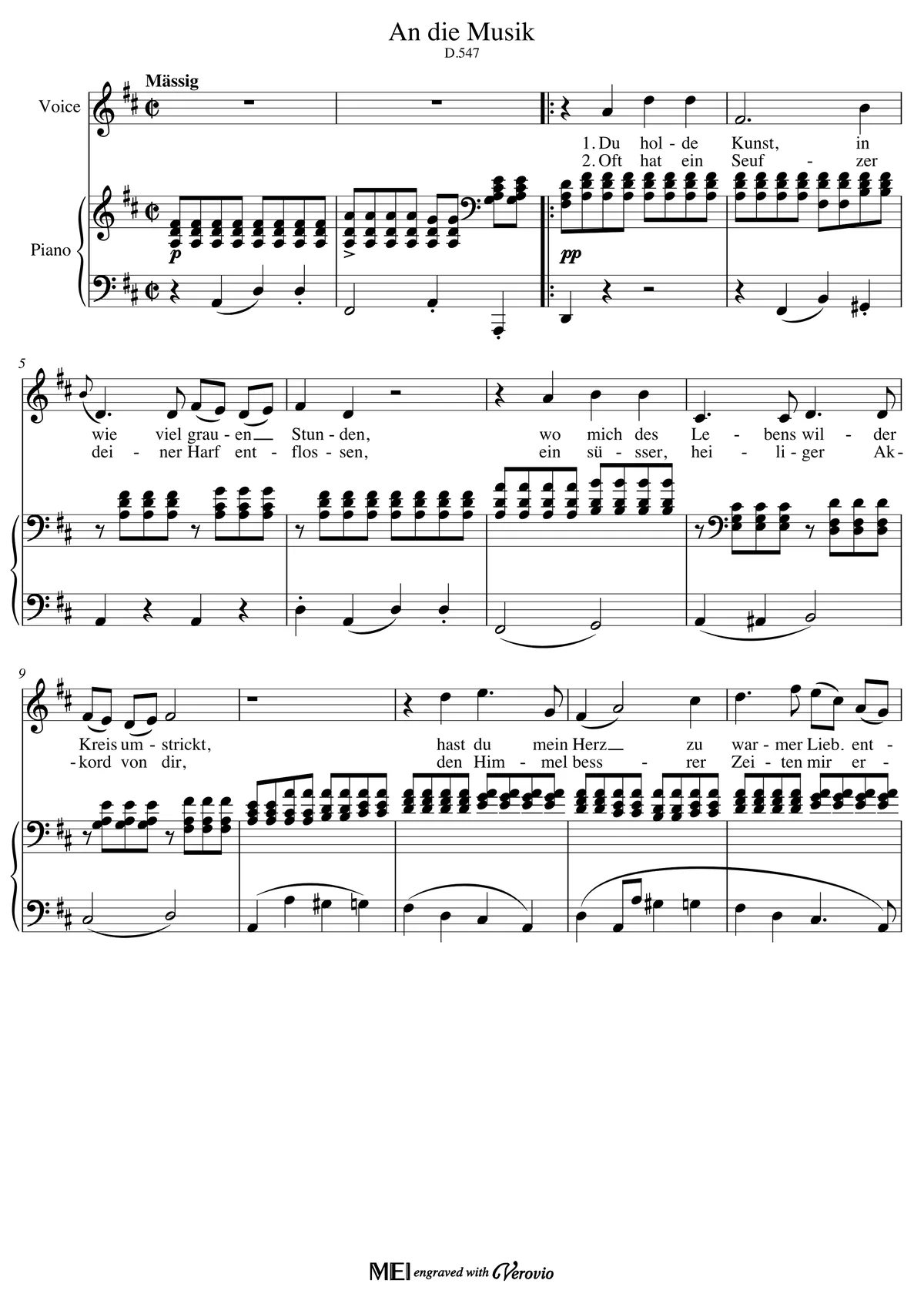
Recognized MIDI
629 notes · 2 tracks (voice and piano)
Of 629 notes, 628 match the score in pitch, onset, and length; one piano note is a semitone off.
Tempo markings are not read, so the MIDI plays at 120 BPM; this song is much slower (about 52 BPM), which you can set in the editor. Clear printed scores work best. Check complex layouts, low-resolution scans, and ties against the score before exporting.
Directly importing the same piece as MusicXML also gives you a 629-note MIDI with separate voice and piano tracks. Download MusicXML
Example score from OpenScore Lieder (CC0) · Schubert's An die Musik
Open a Type 0 or Type 1 .mid / .midi file. Notes and tracks are parsed locally in your browser.
Switch between staff notation and piano roll, listen to playback, and transpose the entire score by semitone or octave.
Download MusicXML for detailed notation work or a clearly labeled PDF draft for quick review.
Turn MIDI from an audio, PDF, or image conversion into staff notation and check pitch and rhythm immediately.
Follow the score during MIDI playback and prepare a practical rehearsal or lesson draft.
Export MusicXML to add articulations, fingering, dynamics, and final layout in MuseScore, Sibelius, or Dorico.
Export PDF for review while keeping MusicXML as the editable source of truth.
| Format | Best for | Editable |
|---|---|---|
| MusicXML | MuseScore, Sibelius, or Dorico notation work | Yes |
| PDF draft | Quick review, printing, and human proofreading | No |
| MIDI | DAW arranging, instruments, and timing edits | Yes |
Choose the conversion path that matches your source. These pages separate general audio, compressed MP3, YouTube/YT workflows, and local MP4/video files so each search intent has one clear owner.
Best default for WAV, M4A, FLAC, recordings, stems, and authorized audio exported from video.
Use the MP3-specific page when your source is compressed MP3 and you need bitrate or retry guidance.
Preview a link, confirm rights, then upload audio you own or are licensed to use for MIDI conversion.
Upload a local MP4, MOV, WebM, or M4V and convert its audio track directly to MIDI.
Yes. PureMIDI reads MIDI notes, rhythm, and tracks, then renders a staff notation preview in the browser.
Yes. MusicXML is the preferred export for continued proofreading and layout in MuseScore, Sibelius, Dorico, and compatible notation apps.
Use it as a starting score. Check rhythmic grouping, voices, lyrics, and advanced notation in the editor before you print or share it.
A manually imported MIDI is parsed and rendered in your browser. It only enters the account storage flow when you explicitly save an online version.
Yes. Importing a MIDI file, previewing the staff notation, transposing, and exporting MusicXML or a PDF draft are free and need no account. An account is only used if you choose to save an online version.
Browser MIDI editor for piano-roll editing, playback, track cleanup, quantize, and export.
Score images and MusicXML to MIDI for practice playback.
Convert digital or scanned sheet-music PDFs into editable MIDI drafts.
Convert audio files or audio exported from video into editable MIDI drafts.
Convert MP3 songs or MP3 audio exported from video into editable MIDI.
AI piano to MIDI converter — turn solo piano recordings into editable MIDI with accurate pitch and timing.